


Explore the IAMMETER App Store
Introduction
IAMMETER users often need more than a standard monitoring page. Some want a simpler local dashboard. Others want a specialized view for MQTT data, remote access, or a specific energy scenario. To make these tools easier to discover and use, IAMMETER provides the IAMMETER App Store.
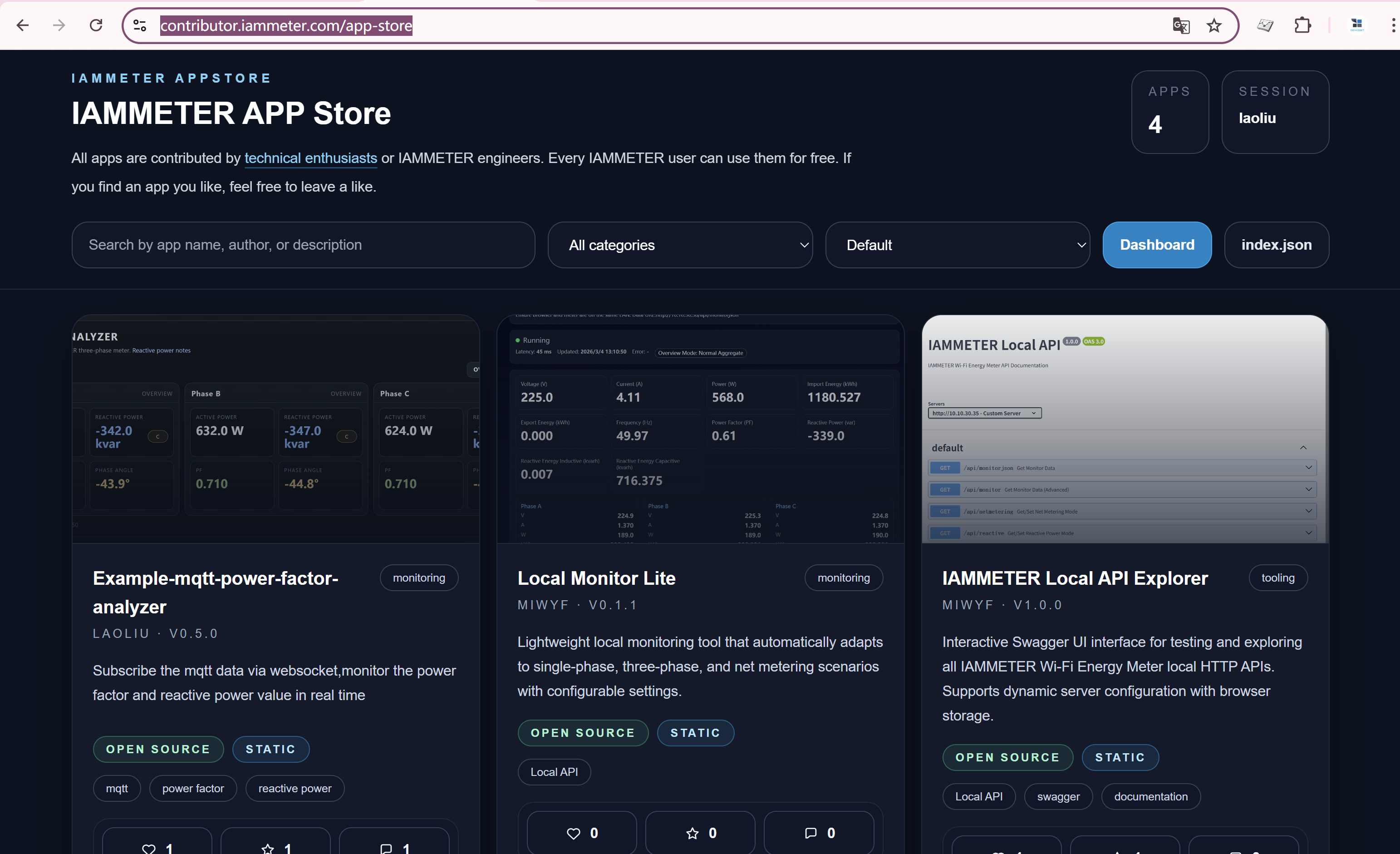
The idea is straightforward: useful apps built by IAMMETER engineers and technical enthusiasts should be available to every IAMMETER user, not only to developers. In many cases, users can open an app, replace the demo token or SN with their own, and start using it immediately.
What Is the IAMMETER App Store
The IAMMETER App Store is available here:
https://contributor.iammeter.com/app-store
It is a collection of lightweight apps built around IAMMETER data and use cases. These apps are contributed by IAMMETER engineers or community contributors who want to create more practical ways to visualize and use energy data.
This matters because IAMMETER is not only about monitoring. The broader goal is to help users understand consumption, improve solar self-consumption, optimize energy usage, and ultimately reduce electricity bills. The App Store extends that goal by making small, focused tools easier to access.
If you want broader context on the IAMMETER ecosystem, IAMMETER Overview and Home Energy Monitoring Solution are good starting points.
Free for Every IAMMETER User
The App Store is designed so that every IAMMETER user can try these apps without doing development work.
In most cases, the setup is simple:
- Replace the demo account token or device SN with your own IAMMETER credentials or meter information
That means users do not need to build an app from scratch just to get a custom dashboard or a more specialized monitoring view. For many users, this is the fastest way to move from raw energy data to a practical interface that supports daily decision-making.
Understanding local, mqtt, and remote
One of the most useful things to understand in the App Store is how each app connects to data. In particular, users should pay attention to the labels local, mqtt, and remote.
local
If an app is labeled local, it typically means:
- Your browser and the IAMMETER meter must be on the same local network
These apps usually access the meter through local interfaces, so they are a good fit for users who want direct local access inside the home or on-site network.
If you want to learn more about IAMMETER local connectivity options, see Local API, Modbus/TCP and MQTT.
mqtt and remote
If an app is labeled mqtt or remote, it does not have the same LAN-only restriction.
These apps are generally more suitable when:
- You are viewing data from a different location
- Your browser is not on the same network as the meter
- You prefer MQTT-based or remote data access
For users who need flexibility beyond the local network, mqtt and remote apps are usually the better choice.
Current Focus: Custom Monitoring Dashboards
At this stage, most apps in the IAMMETER App Store are custom monitoring dashboards. That focus makes sense. Energy users often want different visual layouts, different priorities, and different ways to interpret the same meter data.
Compared with a standard interface, these apps can provide:
- More targeted dashboards for specific scenarios
- Alternative layouts for different user preferences
- Better visibility into consumption, generation, and power flow
- A faster way to build a practical monitoring experience around real usage needs
For users tracking household consumption, solar generation, or site-level performance, this kind of customization can be very useful.
The catalog is still evolving. Right now, dashboards are the main type of app, but more app categories can be added over time as the ecosystem grows.
Voting Helps the Ecosystem Grow
The App Store is not only a list of apps. It also gives users a simple way to support the apps they find useful.
Each IAMMETER user can vote for the apps they like. That has two clear benefits:
- It helps other users discover popular and useful apps
- It gives direct encouragement to the engineers and contributors building them
For a contribution-driven ecosystem, this kind of feedback is important. It helps good apps gain visibility and gives developers a stronger reason to keep improving their work.
Why the App Store Matters
The value of IAMMETER is not limited to collecting data. The real goal is to help users make better energy decisions. Whether the use case is home energy monitoring, solar monitoring, or energy cost optimization, the end result should be better energy management and lower electricity bills.
The App Store supports that goal by making practical tools easier to adopt. Instead of waiting for every feature to become part of a core product release, users can directly try focused apps built for specific needs.
If you are already exploring broader IAMMETER solutions, Solar Energy Monitoring Solution and IAMMETER Cloud Service provide more background on the platform.
Conclusion
The IAMMETER App Store gives users a low-friction way to try community and engineer-built apps on top of IAMMETER data. It is free for IAMMETER users, simple to start with, and especially useful for people who want custom dashboards without doing their own development.
With support for different access modes such as local, mqtt, and remote, the App Store can serve both LAN-based and more flexible remote scenarios. As more apps are added, it can become an increasingly practical part of the IAMMETER ecosystem.
FAQ
Is the IAMMETER App Store free to use
Yes. IAMMETER users can use the apps in the App Store for free. In most cases, they only need to replace the demo token or SN with their own information.
Do I need development skills to use these apps
No. The current goal is to let users directly use existing apps without having to do any development.
What does local mean in the App Store
local means the app usually requires the meter and the browser to be on the same local network.
What is the difference between mqtt and remote
mqtt and remote apps do not have the same LAN restriction as local apps, so they are more suitable for remote or cross-network access scenarios.
What kind of apps are available now
At the moment, the catalog mainly contains custom monitoring dashboards. More app types may be added in the future.