3.1 WEM3162 Quickstart
3.2 WEM3080 Quickstart
3.3 WEM3162T Quickstart
3.4 WEM3080T Quickstart
4.1 Hardware Introduction (Single Phase)
4.2 Hardware Introduction (Three Phase)
4.3 WiFi Setup
4.4 Monitor by Iammeter
4.5 Local Monitoring
4.6 Firmware Upgrade
4.7 Set Your Power Tariff
4.8 View Data by WeChat
4.9 Alert and Notification
4.10 Share your Site
4.11 Agent Function
4.12 Quick View of Energy and Bill
4.13 Set Billing Date
4.14 Analysis: Billing Report
4.15 Analysis: Energy Consumption Analysis
4.16 Analysis: Load Analysis
4.17 Analysis: Abnormal Data Analysis
4.18 Create Account for Your Users
4.19 Feedback and System Notification
4.20 Energy and Bill Forecast
4.21 Set the Time Zone
4.22 Total Saving Report of Solar PV System
5.1 WEM3080 DataSheet
5.2 WEM3080T DataSheet
7.1 Apply in Solar PV System
7.2 Use a GPRS Modem
7.3 Integrate with PVoutput
7.4 Integrate with Third-Party Server
7.5 Integrate with Solax Portal
7.6 Double CT Solution
8.1 Monitor your Solar PV System
8.2 Monitoring QuickStart(WEM3080)
8.3 Monitoring QuickStart(WEM3080T)
8.4 Overview of Solar PV system monitoring
10.1 Integrate with HomeAssistant
10.2 Integrate with openHAB
10.3 Integrate with NodeRED
10.4 Home Assistant & Grafana
11.1 Quick Start
13.1 Latest Update

WiFi Setup

1 WiFi Setup

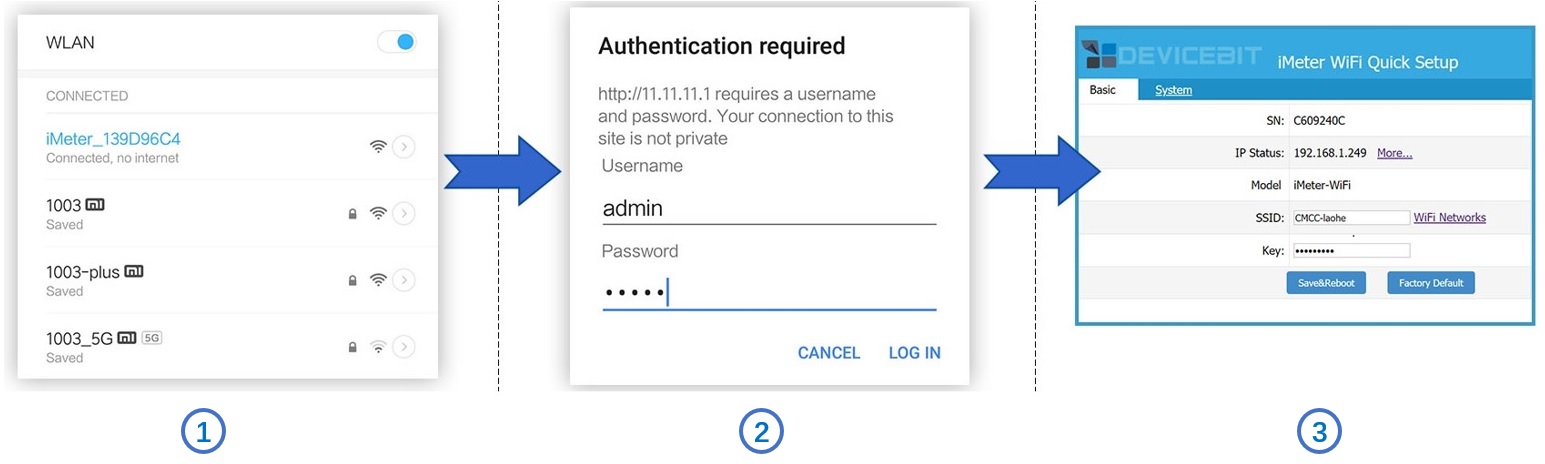
Very few steps to finish Wi-Fi setup.
WiFi Setup

Step1, Use your smart device's Wi-Fi connection setup, connect to the iMeter's network, which will show up as iMeter_xxxxxxxx (xxxxxxxx is unique SN of iMeter). No password required.

Step2, Whilst connected to the iMeter's network, open a web browser and navigate to http://11.11.11.1; Enter the username "admin" and password "admin".

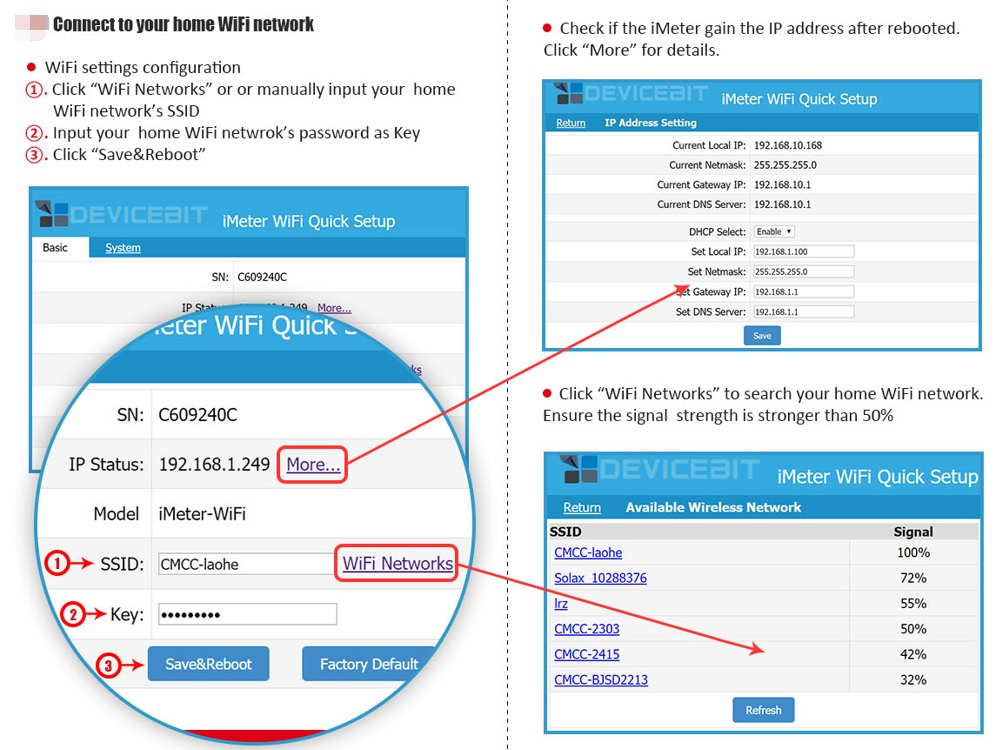
Step3, Connect to home router by clicking "WiFi Networks" or manually input home router's SSID (your home Wi-Fi networks' SSID) and Key (your home Wi-Fi networks' password) and then click "Save&Reboot"

Step4, After rebooted, input IP address
http://11.11.11.1/ on browser and check if the iMeter gain the IP address.

Click "More..." for details.

Click "WiFi Networks" to search your home WiFi network.

Ensure the signal strength is stronger than 50%.
IP Address

Note

If you have a WeChat account, please follow our IAMMETER WeChat public ID.

iammeter.jpg